Graph-based agent workflows
Graph-based agent workflows in ADK let you build agents with more precise control, creating deterministic processes that combine code logic and AI reasoning capabilities. Graph-based workflows allow you to define your agent logic as a graph of execution nodes and edges, combining AI-powered agent reasoning with deterministic tools and code.
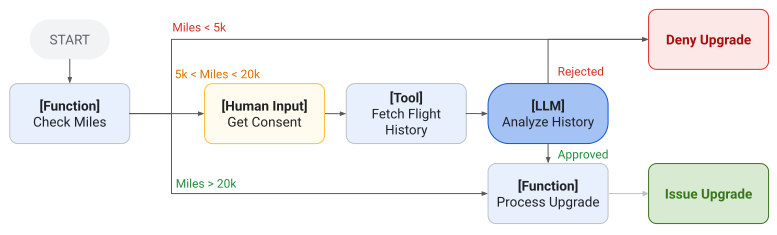
Figure 1. A graph-based agent design for flight upgrades, combining workflow nodes of different types, including Functions, human input, Tools, and LLM capabilities.
Prebuilt ADK template workflows, such as Sequential Agents, provide a defined process flow control only across a set of agents. You can continue to build standard ADK agents with long prompts, tools, and use them in graph-based workflow agents. When you need more precise control, workflow agent graphs give you more flexibility over how tasks are routed and executed. Graph-based workflows provide the following advantages:
- Define precise logic: Explicitly map out routing logic to manage transitions between different nodes.
- Implement complex structures: Build agent workflows that support branching and state management.
- Run chains of functions without AI: Call agent tools and your own code without invoking a generative AI model.
- Enhance reliability: Improve the predictability of your agents by relying on structured node definitions rather than prompts alone.
Get started
This section describes how to get started with graph-based agents. The following example shows how to create a sequential graph-based agent workflow that generates a city name, looks up the current time in that city with a code function, and the final agent reports the information.
from google.adk import Agent
from google.adk import Workflow
from google.adk import Event
from pydantic import BaseModel

city_generator_agent = Agent(
    name="city_generator_agent",
    model="gemini-flash-latest",
    instruction="""Return the name of a random city.
      Return only the name, nothing else.""",
    output_schema=str,
)

class CityTime(BaseModel):
    time_info: str  # time information
    city: str       # city name

def lookup_time_function(node_input: str):
    """Simulate returning the current time in the specified city."""
    return CityTime(time_info="10:10 AM", city=node_input)

city_report_agent = Agent(
    name="city_report_agent",
    model="gemini-flash-latest",
    input_schema=CityTime,
    instruction="""Output following line:
    It is {CityTime.time_info} in {CityTime.city} right now.""",
    output_schema=str,
)

def completed_message_function(node_input: str):
    return Event(
        message=f"{node_input}\n WORKFLOW COMPLETED.",
    )

root_agent = Workflow(
    name="root_agent",
    edges=[
        ("START", city_generator_agent, lookup_time_function,
          city_report_agent, completed_message_function)
    ],
)
In Go, sequential workflows are built by composing sub-agents with
sequentialagent.New. Each agent is an agent.Agent implementation whose
Run function yields *session.Event values. Agents share data between
steps by writing to session state with ctx.Session().State().Set and
reading it back with ctx.Session().State().Get.
// cityGeneratorRun yields a fixed city name and writes it to session state.
func cityGeneratorRun(ctx agent.InvocationContext) iter.Seq2[*session.Event, error] {
    return func(yield func(*session.Event, error) bool) {
        city := "Tokyo"
        if err := ctx.Session().State().Set("city_name", city); err != nil {
            yield(nil, fmt.Errorf("failed to set city_name: %w", err))
            return
        }
        yield(&session.Event{
            LLMResponse: model.LLMResponse{
                Content: &genai.Content{
                    Parts: []*genai.Part{{Text: city}},
                },
            },
        }, nil)
    }
}

// lookupTimeRun reads the city from state and returns simulated time
// information for that city.
func lookupTimeRun(ctx agent.InvocationContext) iter.Seq2[*session.Event, error] {
    return func(yield func(*session.Event, error) bool) {
        city, _ := ctx.Session().State().Get("city_name")
        timeInfo := fmt.Sprintf("10:10 AM in %v", city)
        if err := ctx.Session().State().Set("time_info", timeInfo); err != nil {
            yield(nil, fmt.Errorf("failed to set time_info: %w", err))
            return
        }
        yield(&session.Event{
            LLMResponse: model.LLMResponse{
                Content: &genai.Content{
                    Parts: []*genai.Part{{Text: timeInfo}},
                },
            },
        }, nil)
    }
}

// cityReportRun formats a final message combining the city and time from state.
func cityReportRun(ctx agent.InvocationContext) iter.Seq2[*session.Event, error] {
    return func(yield func(*session.Event, error) bool) {
        city, _ := ctx.Session().State().Get("city_name")
        timeStr, _ := ctx.Session().State().Get("time_info")
        msg := fmt.Sprintf("It is %v in %v right now.\nWORKFLOW COMPLETED.", timeStr, city)
        yield(&session.Event{
            LLMResponse: model.LLMResponse{
                Content: &genai.Content{
                    Parts: []*genai.Part{{Text: msg}},
                },
            },
        }, nil)
    }
}

func newSequentialGetStarted() (agent.Agent, error) {
    cityAgent, err := agent.New(agent.Config{
        Name:        "city_generator_agent",
        Description: "Returns the name of a random city and stores it in state.",
        Run:         cityGeneratorRun,
    })
    if err != nil {
        return nil, fmt.Errorf("failed to create city agent: %w", err)
    }

    timeAgent, err := agent.New(agent.Config{
        Name:        "lookup_time_agent",
        Description: "Reads the city from state and returns the current time.",
        Run:         lookupTimeRun,
    })
    if err != nil {
        return nil, fmt.Errorf("failed to create time agent: %w", err)
    }

    reportAgent, err := agent.New(agent.Config{
        Name:        "city_report_agent",
        Description: "Reports the city and current time from state.",
        Run:         cityReportRun,
    })
    if err != nil {
        return nil, fmt.Errorf("failed to create report agent: %w", err)
    }

    rootAgent, err := sequentialagent.New(sequentialagent.Config{
        AgentConfig: agent.Config{
            Name:        "root_agent",
            Description: "A sequential workflow: generate city → look up time → report.",
            SubAgents:   []agent.Agent{cityAgent, timeAgent, reportAgent},
        },
    })
    if err != nil {
        return nil, fmt.Errorf("failed to create sequential agent: %w", err)
    }

    return rootAgent, nil
}
This sample code demonstrates how you can assemble a simple, sequential workflow and alternate between agent processing and code execution. While you could perform these steps using a single agent with a longer prompt and a tool call, the graph-based approach gives you precise control over the task execution order and the data output from each step.
For more information about data handling with graph-based workflows, see Data handling with workflow nodes and agents.
Build processes with graphs
You can use prompt-based agents to define multiple step processes with descriptions of tasks and procedures using the instructions field of an ADK agent. However, as your instructions and procedures become longer and more complicated, making sure that the agent is following each step and guideline becomes more complicated and less reliable.
Graph-based workflow agents provide a significant advantage over prompt-based agents by allowing you to specifically define the overall process workflow in code. With graph-based agent workflows, each step of the process can be defined as an execution Node in a graph and each node can be an AI agent, Tool, or your programmed code. The following diagram illustrates how a simple prompt-based agent would translate into a workflow agent graph:
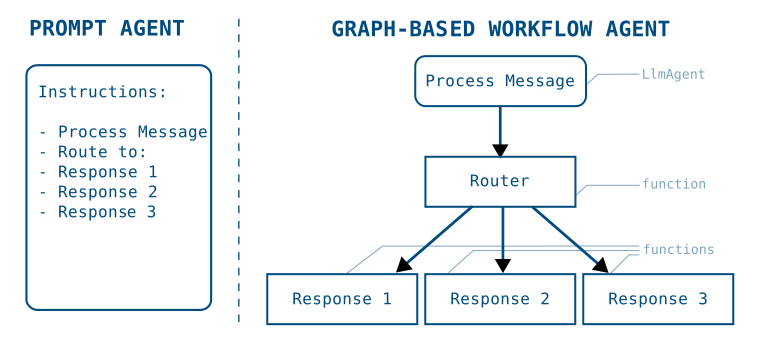
Figure 2. Structure of prompt-based agent instructions translated into a graph-based workflow.
Moving from prompt-based agents to graph-based workflow agents allows you to explicitly break out the tasks of a procedure to define a specific execution flow. Once defined, the agent application flows the steps in the graph, switching between non-deterministic AI-powered agents and deterministic code as needed.
The following code sample shows how the workflow graph in Figure 2 could be translated into a graph-based agent:
process_message = Agent(
    name="process_message",
    model="gemini-flash-latest",
    instruction="""Classify user message into either "BUG", "CUSTOMER_SUPPORT",
      or "LOGISTICS". If you think a message applies to more than one category,
      reply with a comma separated list of categories.
   """,
    output_schema=str,
)

def router(node_input: str):
    routes = node_input.split(",")
    routes = [route.strip() for route in routes]
    return Event(route=routes)

def response_1_bug():
    return Event(message="Handling bug...")

def response_2_support():
    return Event(message="Handling customer support...")

def response_3_logistics():
    return Event(message="Handling logistics...")

root_agent = Workflow(
   name="routing_workflow",
   edges=[
       ("START", process_message, router),
       ( router,
           {
               "BUG": response_1_bug,
               "CUSTOMER_SUPPORT": response_2_support,
               "LOGISTICS": response_3_logistics,
           }
       )
   ],
)
In Go, a processing pipeline is assembled by composing workflow agents. The
example below uses sequentialagent.New to run a classification agent
followed by a handler agent. The classification result is written to session
state with ctx.Session().State().Set and can be read by subsequent agents
to implement branching logic.
// messageProcessorRun classifies an incoming message by writing the category
// to session state.
func messageProcessorRun(ctx agent.InvocationContext) iter.Seq2[*session.Event, error] {
    return func(yield func(*session.Event, error) bool) {
        // In a real workflow this step calls an LLM; here we return a fixed
        // category for illustration.
        category := "BUG"
        if err := ctx.Session().State().Set("message_category", category); err != nil {
            yield(nil, fmt.Errorf("failed to set message_category: %w", err))
            return
        }
        yield(&session.Event{
            LLMResponse: model.LLMResponse{
                Content: &genai.Content{
                    Parts: []*genai.Part{{Text: category}},
                },
            },
        }, nil)
    }
}

// bugHandlerRun handles messages that were classified as bugs.
func bugHandlerRun(ctx agent.InvocationContext) iter.Seq2[*session.Event, error] {
    return func(yield func(*session.Event, error) bool) {
        yield(&session.Event{
            LLMResponse: model.LLMResponse{
                Content: &genai.Content{
                    Parts: []*genai.Part{{Text: "Handling bug..."}},
                },
            },
        }, nil)
    }
}

func newProcessPipeline() (agent.Agent, error) {
    processAgent, err := agent.New(agent.Config{
        Name:        "process_message",
        Description: "Classifies a user message into BUG, CUSTOMER_SUPPORT, or LOGISTICS.",
        Run:         messageProcessorRun,
    })
    if err != nil {
        return nil, fmt.Errorf("failed to create process agent: %w", err)
    }

    bugAgent, err := agent.New(agent.Config{
        Name:        "bug_handler",
        Description: "Handles bug reports.",
        Run:         bugHandlerRun,
    })
    if err != nil {
        return nil, fmt.Errorf("failed to create bug handler: %w", err)
    }

    // In Go, conditional routing is expressed by composing workflow agents and
    // reading session state within each sub-agent's Run function. A
    // SequentialAgent runs each sub-agent in the listed order; the category
    // written to state by processAgent is available to every subsequent agent.
    rootAgent, err := sequentialagent.New(sequentialagent.Config{
        AgentConfig: agent.Config{
            Name:        "routing_workflow",
            Description: "Classifies then routes a message to the appropriate handler.",
            SubAgents:   []agent.Agent{processAgent, bugAgent},
        },
    })
    if err != nil {
        return nil, fmt.Errorf("failed to create routing workflow: %w", err)
    }

    return rootAgent, nil
}
This sample code demonstrates how you can compose a sequence of agents to define a graph with routes between a set of nodes, which are discrete tasks that can include agents, Tools, your code, and even additional workflow agents. For information about building advanced pipelines, see Build graph routes for workflow agents.
Known limitations
There are some known limitations with graph-based workflows. They are not compatible with the following ADK features:
- Live Streaming functionality is not compatible with graph-based workflows.
- Integrations: Some third-party Integrations may not be compatible with graph-based workflows.
Go: graph syntax not yet available
The Python Workflow class with edges arrays, JoinNode, and
Event(route=...) conditional routing are not yet available in ADK Go.
In Go, use the prebuilt workflow agents —
sequentialagent,
parallelagent, and
loopagent — to compose
deterministic, multi-step agent pipelines.